The Problem
Text-to-speech engines may mispronounce proper nouns, brand names, acronyms, foreign-language terms, and industry-specific jargon. They may also read something correctly - but not EXACTLY how you want it. So - we developed a simple tool for our users to define custom word-to-pronunciation mappings, so the generated speech sounds PRECISELY as they want it.
The Solution - TTSReader’s Pronunciation Dictionary
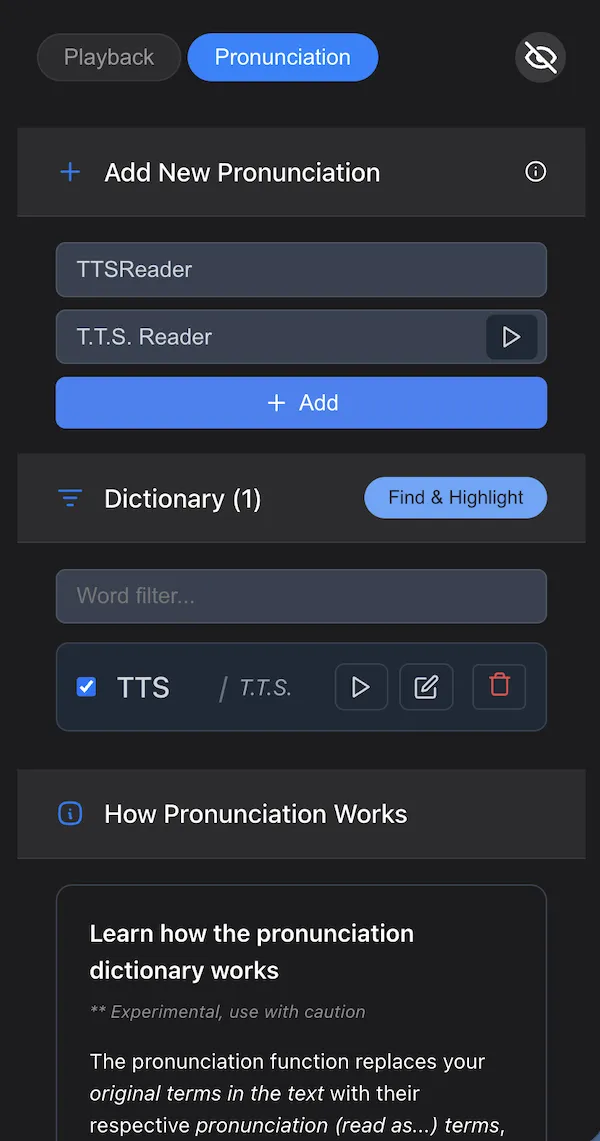
TTSReader now includes a Pronunciation Dictionary — a built-in feature that lets users define custom word-to-pronunciation mappings. Each entry specifies an original term and its desired spoken form. At synthesis time, TTSReader performs the replacements automatically, leaving the original text completely intact.
This is a capability that most competing TTS platforms do not offer at the user level. TTSReader puts pronunciation control directly in the hands of the end user — no API calls, no SSML markup, no workarounds.
Try it now at ttsreader.com/player/
Key Capabilities
- Whole-word matching — replacing
readwill not affectreadingoralready. Replacements are precise and predictable. - Case-sensitive matching —
Hiandhiare distinct entries, enabling selective replacement of specific word forms within the same text. - Inline audio preview — test how a replacement sounds using the built-in play button before committing the entry to your dictionary.
- Find & Highlight — visually identify all matching words in the main text area before synthesis, so you can verify coverage.
- Per-entry toggle — enable or disable individual dictionary entries via checkbox without deleting them, allowing rapid iteration.
- Phonetic input support — the replacement term does not need to be a real word. Any string that produces the correct spoken output is valid (e.g.,
Zhuh-NEHVfor “Geneve”).
Use Cases
Content Production — Publishers and content creators working with branded terminology can define pronunciations once and apply them across all future documents. A single dictionary entry for a brand name like Kaelo (read as Kai-lo) eliminates mispronunciation across every text processed in TTSReader.
Education & Research — Academic content contains specialized vocabulary that standard TTS engines routinely mispronounce. Educators can pre-configure correct pronunciations for scientific terms, historical names, and foreign-language references, ensuring audio materials are accurate and reliable.
Enterprise & Business — Corporate documents reference internal project names, partner organizations, and industry acronyms. The Pronunciation Dictionary ensures that generated audio for reports, presentations, and internal communications sounds professional and correct.
Multilingual Documents — Text that mixes languages presents a well-known challenge for TTS. Foreign names and terms embedded in English text are nearly always mispronounced. The dictionary allows users to specify phonetic approximations that guide the engine to the correct output.
Accessibility — For users who depend on TTS for daily information consumption, mispronounced words are not merely an annoyance — they obscure meaning. Consistent, correct pronunciation directly improves comprehension and usability.
How to Use It
- Open TTSReader Player and navigate to Settings.
- Locate the Pronunciation Dictionary section.
- Enter the original term and the desired pronunciation (“read as”) value.
- Use the play button to preview the result.
- Save the entry. TTSReader will apply it automatically on every subsequent synthesis.
The dictionary persists across sessions. Entries can be toggled on or off individually, edited, or removed at any time.
Availability
The Pronunciation Dictionary is available now in TTSReader Player. As always — feedback and suggestions are welcome as we continue to refine it.