Creating Multi-Voice & Multi-Languages in TTSReader
Posted in How-To, Technical Guide on January 8, 2026 by Amiel ‐ 3 min read
One of the most powerful applications of our synthesis control codes is the creation of multi-voice dialogues from a single text file. This guide provides a practical, step-by-step walkthrough of how to use the {{set}} code to assign different voices to different characters in a script.
This technique allows you to produce complex, conversational audio without any post-processing or audio editing.
The Core Technique: Scripting with {{set}}
The fundamental principle is to insert a {{set}} code before each piece of dialogue to switch the active voice to the desired character.
The workflow is as follows:
- Write the complete dialogue in the TTSReader player.
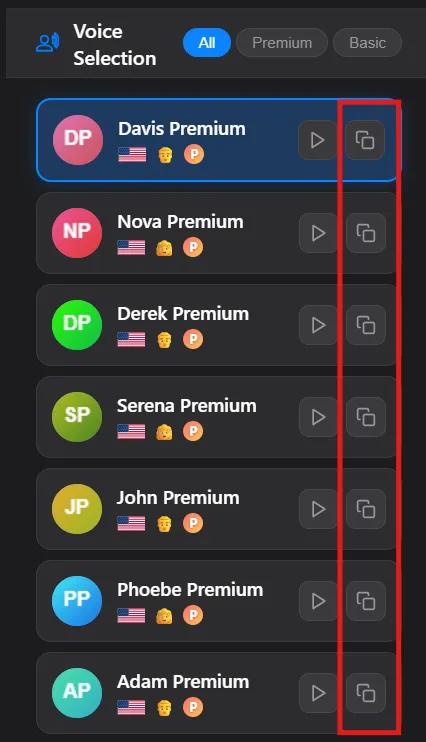
- For each character in your dialogue, select the desired voice and settings in the player’s voice selection menu.
- Use the “copy” button to get the full
{{set:...}}code for that specific voice configuration. - Paste this code directly into your text before the character’s line.
Step-by-Step Example
Let’s convert a simple two-person script into a multi-voice audio file.
Step 1: The Plain Text Script
First, write your script with clear character labels.
Is the new system deployed?

Yes, it went live this morning.

Any issues reported?

Just one minor bug. I'm working on a patch now.
Step 2: Assigning Voices
Now, we will assign voices to Nova and Davis.
- In the TTSReader player, choose a voice for Nova. Use the copy button to get the code.
- Choose a different voice for Davis. Copy his code as well.
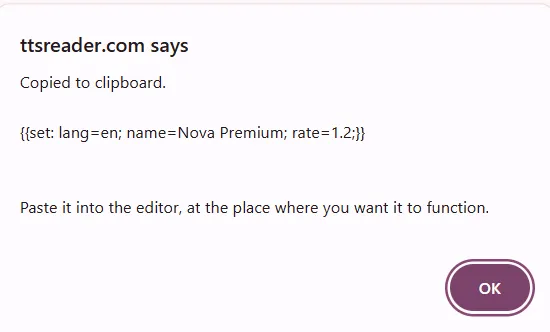
The codes will look like this (your specific codes may vary):
- Davis’s Code:
{{set: lang=en; name=Davis Premium; rate=1.2;}} - Nova’s Code:
{{set: lang=en; name=Nova Premium; rate=1.2;}}
Step 3: Assembling the Final Text
Finally, insert these codes into your script. It’s also good practice to remove the character labels and add {{pause}} codes for more natural pacing.
{{set: lang=en; name=Nova Premium; rate=1.2;}}
Is the new system deployed?

{{pause:1000}}

{{set: lang=en; name=Davis Premium; rate=1.2;}}
Yes, it went live this morning.

{{pause:800}}

{{set: lang=en; name=Nova Premium; rate=1.2;}}
Any issues reported?

{{pause:1000}}

{{set: lang=en; name=Davis Premium; rate=1.2;}}
Just one minor bug. I'm working on a patch now.
When you play this text, the TTS engine will automatically switch between the voices for Davis and Nova, creating a natural-sounding dialogue.
Use Cases
- E-Learning & Training: Create engaging, scenario-based training modules that simulate real-world conversations between employees and customers.
- Screenwriting & Storytelling: Bring scripts to life by assigning unique voices to each character, allowing writers to preview how their dialogue flows.
- Game Development: Rapidly prototype in-game conversations and narrative sequences without needing to hire voice actors for early builds.
- Language Learning: Many of our users create custom audios that contain a sentence in one language - and then the translated sentence in another language. This is a great way to learn a new language.
This technique provides a powerful and efficient method for producing high-quality, multi-speaker & multi-lingual audio directly from any text.